
Cost-Effective Backend Scaling Without Traditional Load Balancers
A practical approach to using edge compute as a lightweight entry layer for scalable backend systems.

When it comes to scaling a backend, the first instinct is always the same, throw a load balancer in front. AWS, GCP, Cloudflare, pick one. These tools exist precisely for this, so nobody questions it.
But at scale, they get expensive fast. And there's a cheaper way that almost nobody talks about.
Why Traditional Load Balancers Hurt
The usual options are reliable but quietly expensive: a fixed base cost plus per-GB data transfer. Even Cloudflare’s Load Balancer starts at $5/month and adds $0.50 per million requests after 500k—costs that scale quickly with traffic.
There’s an interesting middle ground that doesn’t get talked about enough: using edge compute (Worker) as a smart entry layer.
Why a Worker?
Cloudflare Workers are serverless compute that run at the edge.
They are not meant to be load balancers and they do have real constraints like CPU limits, Small bundle sizes etc.
But one property changes the entire conversation: Workers have no limit on the number of requests they can handle.
They're built to be absurdly scalable. You can use it as a stateless request distributor in front of your backend. CF Workers can handle insane amount of request seamlessly.
The Latency Concern
Workers are serverless, which means Cloudflare runs them wherever the user is, by default, not where your server is.
So if your backend is in Mumbai and the Worker runs in US East, every request has to travel to Mumbai adding extra latency.
The fix is Worker Placement.
You can use Cloudflare Smart Placement to automatically run your Worker near where your backend traffic is highest. Or, you can pin the Worker to a specific region, and Cloudflare will try to keep it there.
With Smart Placement, the latency between the Worker and your backend drops to ~2–3 ms—negligible in the bigger picture.
How the Whole Thing Actually Works
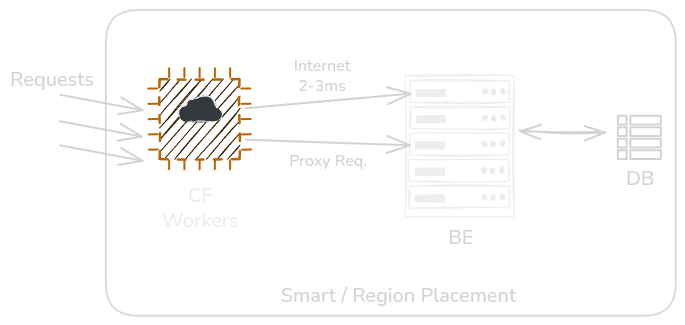
The Worker has a hardcoded list of backend targets:`1.1.1.1:3000`, `1.1.1.1:3001`, `1.1.1.1:3002` & backups `2.2.2.2:3000`.
When a request comes in, the Worker picks one at random IP and proxies the request.
No fancy algorithm. Just randomness. And randomness is enough, over enough requests, load distributes evenly across all processes. The law of large numbers does the work.
Multi-Core Utilization
Node.js has a single thread. Python too. If you run one process on a 4 core server, then you have 3 cores sitting idle (there are workaround to spawn more thread).
The fix is running multiple instances, (one per core, on a different port) and let worker distribute the load between them.
Horizontal Scaling
At 10,000 req/sec across 10 processes, each one handles 1,000 RPS. Node handles that comfortably. Want to scale more? Add instances. The Worker's address never changes — the fleet behind it does.
Making It Smart
You can enhance your load balancer with:
- Timeouts: Set request timeouts to prevent hanging connections
- Retries: Retry requests with different backend endpoints up to 3 times before returning an error
- Health checks: An external monitoring service can update the list of healthy backend IPs and trigger Worker redeployment without downtime
Cost at Scale
Cloudflare Workers are $0.30 per million requests. Add a bit for CPU time, you're looking at ~$0.33–0.35/million in practice. That's about ~$350/billion requests.
| Provider | Approximate Cost |
|---|---|
| Cloudflare Worker | ~$0.33–0.35 per million requests |
| Cloudflare Load Balancer | $5/month base + $0.50/M after first 500k |
| AWS / GCP Load Balancer | Higher still, due to unpredictable data transfer fees |
The Worker approach is 2–3× cheaper than Cloudflare’s own load balancer. AWS & GCP cost even more due to data transfer fees.
Where It Falls Short
Traffic between the Worker and your backend still goes over the public internet. Smart Placement keeps latency low, but it’s not the same as internal routing—so it’s not ideal for latency-sensitive workloads.
IP management isn’t automatic. When you scale your backend up or down, you need to update the Worker config. You can script this with Cloudflare’s API, but it won’t happen by itself.
Workers should also stay lightweight to avoid extra CPU usage.
Should You Actually Use This?
For a solo dev or small team with growing traffic, this works simple, cheap, and clean. But you’ll outgrow it once you need private routing, compliance, or full managed features. It’s a trade: simplicity and cost now, enterprise capabilities later.
The fun part wasn't the setup. It was realising the "wrong" tool was actually the right one you just had to know which constraint mattered.
Conclusion
Using Cloudflare Workers as a load balancer is a cost-effective, scalable approach for backend infrastructure. While Workers weren't designed specifically for load balancing, their infinite scalability and low cost make them an excellent choice especially for startups and teams looking to optimize infrastructure costs without sacrificing performance.
Built something similar or have a smarter approach? Find me on X or LinkedIn.